


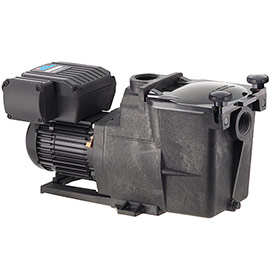

HAYWAR SUPER PUMP VS
INSTALLATION<</div
- TURN OFF THE ELECTRICAL POWER AT THE CIRCUIT BREAKER AND REMOVE THE USER INTERFACE.
- Loosen the two screws securing the user interface to the motor drive and remove the user interface.
Disconnect the short cable that extends out from the motor drive to the user interface.
Loosen the three screws securing the interface mounting plate to the motor drive and remove the interface mounting plate to gain access to the drive wiring compartment.
Disconnect the short cable on the interface mounting plate from the RS485 terminal block on the drive PCB. - Connect 230VAC line power supply wiring to the terminals and ground screw as shown in the Input Power Wiring diagram. Wiring must be routed through the right side conduit opening.
- If the pump will be controlled using a Hayward pool control, connect a two-conductor cable as shown in the Hayward Automation Control Wiring diagram.
- If the pump will be controlled using relay contacts from an external control, connect the digital input terminals to the relay contacts as shown in the External Relay Speed Control Wiring diagram.
- If the installation will use the remote stop feature of the drive, connect the digital input terminals to the remote stop switch as shown in the Remote Stop Wiring diagram.
- Wiring for remote control and/or remote stop functions must be routed through the left side conduit opening.
Use a multi-conductor, jacketed cable suitable for the installation location. Use a liquid tight cordgrip, appropriately sized for the cable being used, to seal the left side conduit opening. - Connect the pump to the pool bonding system using 8AWG (6AWG for Canada) wire. A lug for bonding is provided on the outside of the drive enclosure.
- After all electrical connections have been made, replace the interface mounting plate, taking care to make sure it is properly aligned with the motor drive, and tighten the three screws to secure.
Reconnect the short cable on the interface mounting plate to the RS485 terminal block on the drive PCB.
Reconnect the short cable that extends out from the motor drive to the user interface.
Mount the user interface to the interface mounting plate in the desired orientation.
Note: The interface mounting plate/wiring compartment cover must be installed properly to provide
environmental protection for the wiring compartment. - Apply power to the system, and proceed to “Configuration Menu”, section 6.6, or see section 5.4 for details regarding Hayward automation control.
FEATURES
- Save up to 80% on energy costs when compared to ordinary single-speed pumps
- Right-sized for a faster payback compared more expensive variable speed models
- Permanent magnet motor for improved energy efficiency
- Totally enclosed fan cooled (TEFC) motor for added reliability
- Operates quietly, especially at energy-saving lower speeds
- 110 cubic-inch basket has extra leaf-holding capacity